

15.6-inch Wall Digital Calendar,Smart WiFi Calendar & Chore Chart,Full HD Touchscreen Interactive Display for Family Schedules-Wall/Desk Mountable Planner,Meeting Reminders & Deadline Tracking
Original price was: $179.98.$169.99Current price is: $169.99.
Related Products






Product description
Ultimate Smart Wall Planner Calendar-Seamless Event Syncing 
 Personalize List -Color Code/Tag Names
  Turn on Sleep Mode – Please Set The Time First
 Easy to Sync-On The Same Page
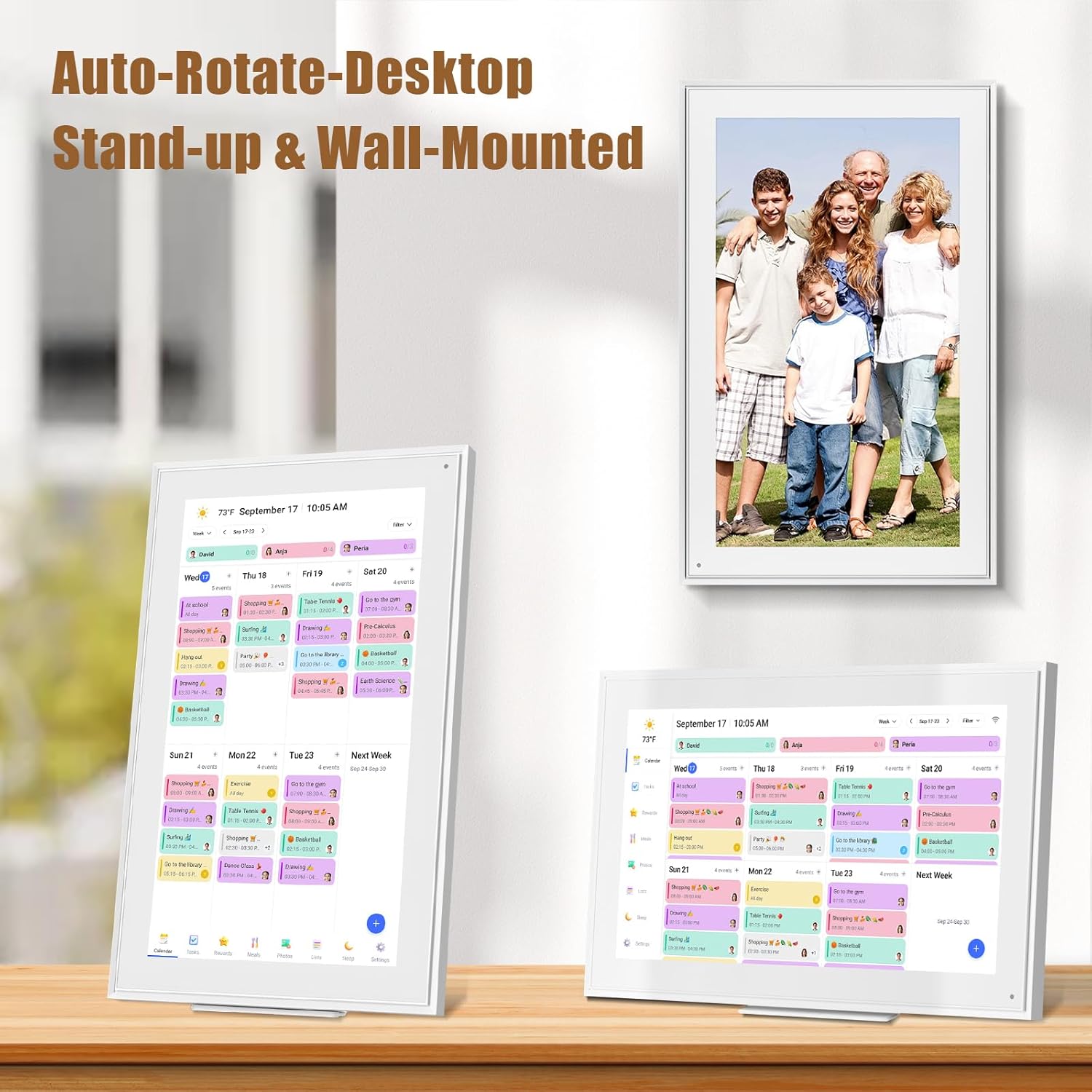
  Mount- Horizontally/Vertically
1 Customize Alarm Reminder
2 Smart Sleep Mode
3 App Send Photos & Videos
4 Smartphone APP Syncing
5 Multiple Scenes
Impressive Features-Personalization Design 
Perfect Gift for You Lover 
User Guide: Operating Videos How to register an account and log in ?
step1:Turn on your eCalendar, select language, connect to wifi
step2:choose the time zone and city,then enter your 6-digit activation code to get started.
The video showcases the product in use.The video guides you through product setup.The video compares multiple products.The video shows the product being unpacked. 15.6-inch Wall Planner Digital Calendar
The video showcases the product in use.The video guides you through product setup.The video compares multiple products.The video shows the product being unpacked. 15.6-inch Wall Planner Digital Calendar
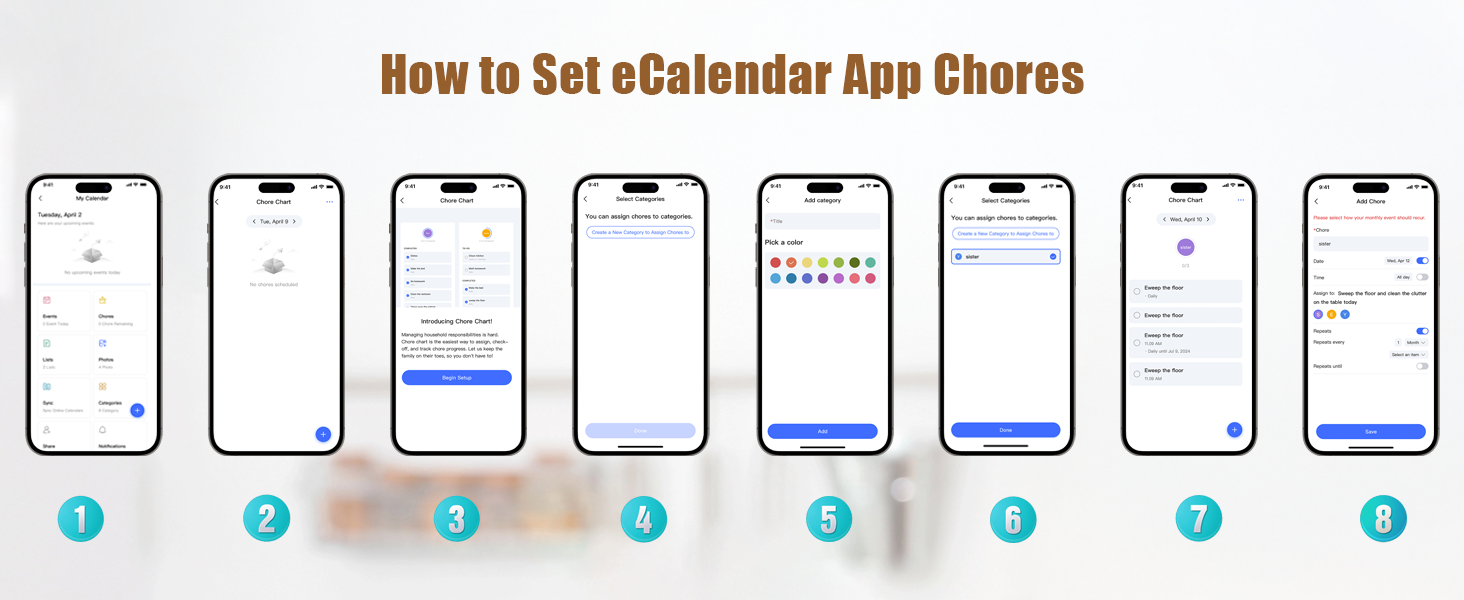
How to edit Chores ?
Step 1:Press “+”button in the bottom right of the Chores screen to add a chore.
Step 2:Name the chore and assign it to as many members of the family as you would like.This will create a separate chore for each member.
Step 3:Press Save and your chores will be created.
Notice:If you want the chore to happen every day, week, or month, toggle on Repeats.
How to edit Lists ?
step1:Tap the Lists icon in the sidebar to open lists.
step2:Tap the arrow next to the list name, such as Shopping List.
step3:Press +New List, Enter the new list name and choose a color and list type.
step4:Tap a list, and add items.
The video showcases the product in use.The video guides you through product setup.The video compares multiple products.The video shows the product being unpacked. 15.6-inch Wall Planner Digital Calendar
The video showcases the product in use.The video guides you through product setup.The video compares multiple products.The video shows the product being unpacked. 15.6-inch Wall Planner Digital Calendar
How to post photos ?
step 1:Click on the photo option on the eCakendar App page
step 2:Select a photo on your phone
step 3:Enter the calendaremail address
How to synchronize the calendar ?
Notice:Syncing can only be done through the app.
step1:Open Sync in the home screen.
step2:Select “Sync a New Calendar”.
When you sync a source calendar (like Google, iCloud, Outlook) with eCalendar any changes on your source calendar will automatically show up on the digital calendar.
The video showcases the product in use.The video guides you through product setup.The video compares multiple products.The video shows the product being unpacked. 15.6-inch Wall Planner Digital Calendar
The video showcases the product in use.The video guides you through product setup.The video compares multiple products.The video shows the product being unpacked. 15.6-inch Wall Planner Digital Calendar
How to set the alarm clock in sleep mode ?
step 1:Tap the moon icon located in the bottom of the sidebar.
step 2:Toggle on Sleep Mode Schedule and choose a time for your Calendar to go to sleep and to wake up. Press Save to confirm.
Notice:When your Calendar is in Sleep Mode, you can tap the power button at any time to wake the device up.


 Lists-Personalize Color Code
Customize your calendar-just touch you screen with colors and unique tag names.
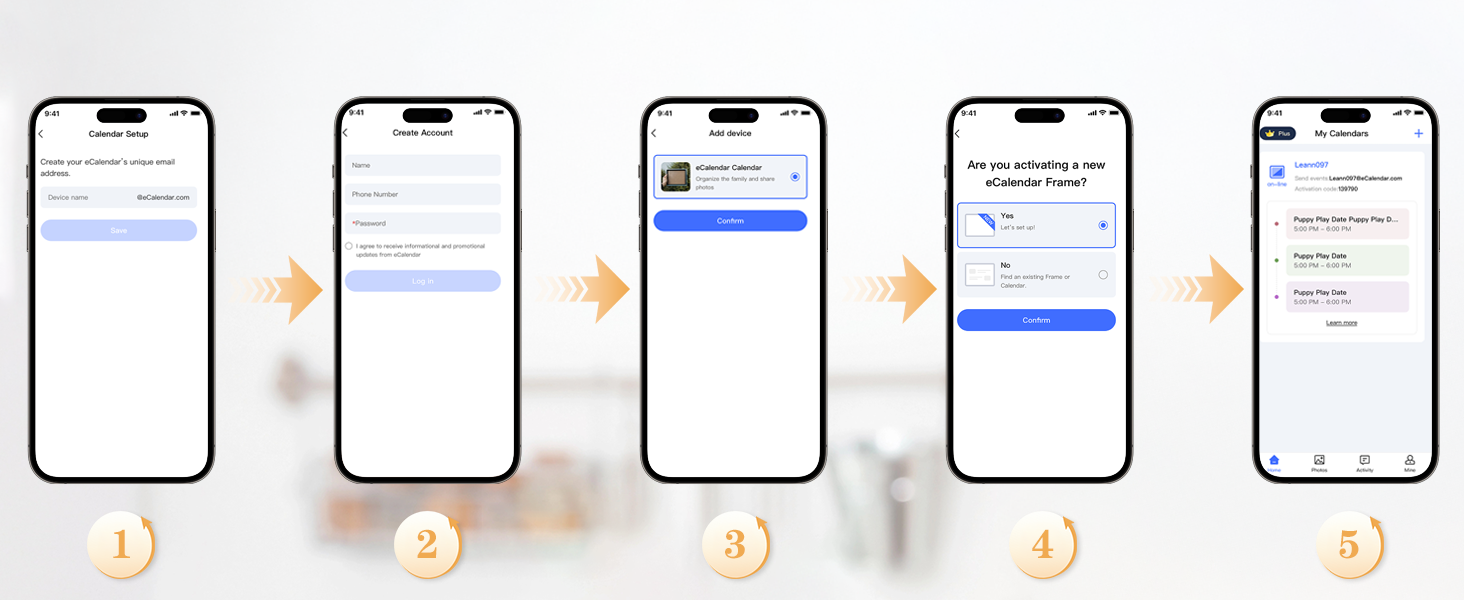 Download Free APP eCalendar-Daily Planner
App Access-Simple setup – automatic synchronization
✔️𝐀𝐥𝐥-𝐈𝐧-𝐎𝐧𝐞 𝐒𝐦𝐚𝐫𝐭 𝐅𝐚𝐦𝐢𝐥𝐲 𝐂𝐚𝐥𝐞𝐧𝐝𝐚𝐫: WiFi-connected touch digital calendar combined with a digital planner ,the crystal-clear 15.6″ FHD touchscreen with chore chart and to do list notepad, generates the whole new calendar, which makes your family organized and stays every schedule on track. Assign unique colors and chores to each family member,making family scheduling simpler and more intuitive.Ideal gift for students,mom,lover,grandparents,parter,colleague,professionals, and families..
✔️𝐈𝐦𝐩𝐫𝐞𝐬𝐬𝐢𝐯𝐞 𝐅𝐞𝐚𝐭𝐮𝐫𝐞𝐬 & 𝐄𝐚𝐬𝐲 𝐭𝐨 𝐒𝐞𝐭-𝐔𝐩/𝐀𝐮𝐭𝐨-𝐒𝐲𝐧𝐜:Seamless calendar synchronization,Just plug in the device, connect to Wi-Fi and sync your calendars.all your events will automatically populate and sync. Add events or chores directly on the device or use the free to download mobile app.ensuring your family stays organized and no tasks are missed. Compatible with icloud Calendar, Google Calendar, Outlook Calendar, Cozi, and Yahoo,easying management and sharing of your schedule across all your devices.Authorize additional devices for even greater convenience.
✔️𝟏𝟓.𝟔 𝐈𝐧𝐜𝐡 𝐈𝐏𝐒 𝐇𝐃 𝐓𝐨𝐮𝐜𝐡𝐒𝐜𝐫𝐞𝐞𝐧 𝐃𝐢𝐬𝐩𝐥𝐚𝐲:The 15.6” WiFi digital picture frame is featured with a high-quality HD 1980*1080 Resolution IPS touch screen which allows you to get a wonderful picture visual from any angle. Perfect for displaying your family calendar and photos in high resolution.,Whether you’re checking schedules, managing household chores, or viewing photos, everything is displayed with outstanding visual quality, enhancing the overall user experience.Customizable color-coding and adjustable fonts ensure readability for all ages- ideal for grandpa’s/grandma’s clear viewing.
✔️𝐈𝐧𝐭𝐞𝐫𝐚𝐜𝐭𝐢𝐯𝐞 𝐂𝐡𝐨𝐫𝐞 𝐂𝐡𝐚𝐫𝐭 𝐚𝐧𝐝 𝐌𝐞𝐚𝐥 𝐏𝐥𝐚𝐧𝐧𝐢𝐧𝐠:Compatible with a free downloadable mobile app, you can conveniently add, edit, and manage activities, chores, and meal plans from your phone. This seamless mobile synchronization allows you to update and view your family calendar anytime, anywhere, enhancing flexibility and convenience. It’s highly functional for families with busy schedules, making remembering and managing multiple activities easier.
✔️𝐌𝐚𝐧𝐚𝐠𝐞 𝐟𝐫𝐨𝐦 𝐀𝐧𝐲𝐰𝐡𝐞𝐫𝐞 & 𝐒𝐭𝐚𝐲 𝐂𝐨𝐧𝐧𝐞𝐜𝐭𝐞𝐝 𝐰𝐢𝐭𝐡 𝐟𝐚𝐦𝐢𝐥𝐲 𝐦𝐞𝐦𝐛𝐞𝐫𝐬:Stay connected with the powerful eCalendar App. Access and manage your calendar on the go, with free features like a photo frame, chore chart, dinner plan, grocery list, and more. OnesInstantly update your life moments and send instant or timed wishes to the photo frame at any time anywhere. Stay connected with family, especially for those who live in a distance. It helps to stay close to your family members, it is a perfect gift for the elder to feel connected with the young generation.
🎁𝐏𝐞𝐫𝐟𝐞𝐜𝐭 𝐆𝐢𝐟𝐭: Perfect gift for Thanksgiving, Christmas, Wedding, Birthday, Mother’s Day, Father’s Day, Valentine’s Day, and so on. It has multi-functions, such as photos/videos, sleep mode, adjustable brightness. Customize your digital wall calendar touch screen with colors and unique tag names.Share your calendar with friends, family, or colleagues and coordinate plans effortlessly. Can view and edit the calendar the same time, Support permission classification, Assign tasks to multiple person and track project progress.With a removable stand, you can place it in both landscape and portrait mode. The wall mount hole on the back also allows users to mount it to the wall.
✔️𝐁𝐞𝐬𝐭 𝐂𝐮𝐬𝐭𝐨𝐦𝐞𝐫𝐬 𝐒𝐞𝐫𝐯𝐢𝐜𝐞𝐬 & 𝟏𝟎𝟎% 𝐍𝐨𝐧𝐞-𝐖𝐨𝐫𝐫𝐲 𝐖𝐚𝐫𝐫𝐚𝐧𝐭𝐲: We provide a one-year warranty service and 24-hour online customer services for assisting you with any needs. If you encounter any problem, please feel welcome to tell us on Amazon, we definitely give you a satisfactory solution.
User Reviews
Be the first to review “15.6-inch Wall Digital Calendar,Smart WiFi Calendar & Chore Chart,Full HD Touchscreen Interactive Display for Family Schedules-Wall/Desk Mountable Planner,Meeting Reminders & Deadline Tracking”
Original price was: $179.98.$169.99Current price is: $169.99.
There are no reviews yet.